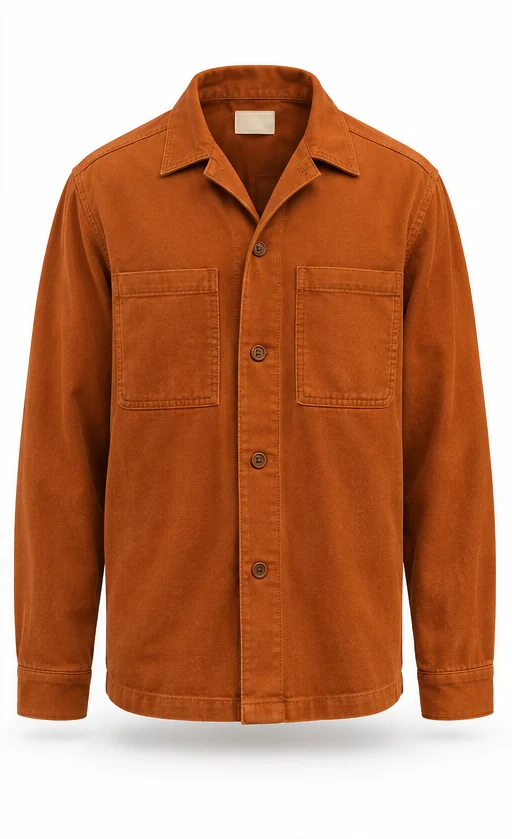
Ghost Mannequin App for Clothing Product Photos

Upload a front mannequin photo and an inside-collar close-up to create a white-background product image.

Ghost mannequin AI uses both photos to create the hollow neckline. Compare the details before you download a 2K JPG with the ghost mannequin effect.

See what to upload

Photo workspace

2K JPG

JPG, PNG, or WebP · Up to 10 MB each

Checking image generation availability.

Illustrative exampleSee both inputs
Illustrative rust overshirt on a white background with its inside neckline visible

Ghost Mannequin Before and After

Choose from 30 T-shirts, shirts, and jackets. Compare the front and inside-collar photos with the finished image to see how the neckline changes.

What to Upload

Start with one T-shirt, shirt, or jacket. Use soft, even light so the fabric color looks the same in both photos.

  1. Photograph the front

    Face the mannequin straight on. Keep the collar, sleeves, and hem inside the frame. On a button-up shirt, use the placket as a vertical reference. If the top button sits well to one side of the hem, straighten the shirt on the form and take the photo again. That is easier than judging a crooked silhouette from the edited image later.

  2. Photograph the inside collar

    Open the neckline. Capture the inside fabric and tag of the same garment in focus. Keep the camera on the same side of the garment so a printed label reads the right way round. Check the close-up next to the front shot before putting the piece away. You should be able to point to the place where the inside seam joins each shoulder.

  3. Review the edit and export

    Switch between the edit and the originals. Download the JPG after checking the important details. View it once at listing thumbnail size to check the overall shape, then enlarge the neckline and any lettering for a closer look.

How to Check a Ghost Mannequin Edit

Look at the edit next to both original photos. Retake a blurry reference or keep the original listing image if the edit changes something buyers need to see.

  • Collar and labelCompare the inside seam and any readable tag text.
  • Print and textureLook for changed logos, stitching, or fabric grain.
  • Buttons and fastenersCheck the count, placement, and shape.
  • Color and shapeCheck the actual shade, sleeve edges, and hem against your source.

Prepare Your Listing Images

Keep the original along with the edited JPG so you can check the product and meet your storefront’s photo requirements.

Shopify clothing shops

Give T-shirts or jackets a consistent white background across product cards. For a style sold in several colors, photograph the front and inner collar of each color separately. A navy shirt can have different thread, buttons, or neck tape from the white version. Open both listings side by side and check that each thumbnail still shows the right details.

Etsy clothing sellers

Use the edit as an extra listing photo where allowed. Keep a real, unedited photo of the actual garment. If you sell a vintage piece, photograph repairs, fading, or a worn collar separately. Buyers need to see the condition of the item they will receive. Keep a close-up in the listing when an imperfection is hard to see in the full-length view.

Etsy photo requirements

Small apparel studios

Group each pair of source photos by style and color before editing. For example, save a charcoal jacket’s front and collar shots under the same product code. Work through one pair at a time and keep the exported JPG beside its originals. The person preparing the listing can then check the buttons and neck tag against the exact piece that was photographed.

What to Look for in Different Fabrics

Start with the part of the garment that a buyer would recognize in a close-up. The examples above let you enlarge the front, inside collar, and result individually.

Ribbed necklines and knits

Lay the neckband in its natural curve before taking the collar shot. Pulling a stretch knit taut makes its opening wider and its ribs farther apart. In the finished image, follow the ribs from one shoulder around the neck. If the band suddenly grows thicker on one side, compare that edge with the front photo.

Denim and visible stitching

In the charcoal denim jacket example, use the button placket to orient yourself in all three views. Follow the topstitching where the collar folds back. A dark wash can hide the thread in shadow, so check that the needle lines are visible in your source photo before you upload it. Count the buttons again before publishing the edit.

Lined jackets and coats

Open the collar just enough to show where the lining meets the outer fabric. Include a little of each material and the seam between them in the close-up. In the edit, check that a bright lining ends at that seam. If the lining pattern continues onto the lapel, retake the close-up with the fold clearly visible.

One-time image credits

Use one-time image credit packs when you edit photos in batches. See Pricing for current purchase availability.

View pricing

Frequently Asked Questions

Contact support
What is a ghost mannequin effect?

It makes clothing appear to hold its shape on an invisible form. The inside neckline stays visible where the mannequin would normally cover it.

Why do I need an inside-collar photo?

Your front shot shows the outer shape. The collar close-up gives the tool a reference for the fabric, seam, and tag hidden by the mannequin. Photograph the same garment and color in both shots.

Can I start with a flat lay or a hanger photo?

A flat lay works well when a buyer needs to see the full outline or read a large print. A ghost mannequin view shows how the shoulders, chest, and neckline sit on a form. For this app, put the garment on a mannequin and photograph it straight on. You can keep the flat lay as a second listing photo.

Will the app preserve my logo and label exactly?

Small text, an intricate print, and tiny fasteners can change during an AI edit. Compare these areas with your original photos before using an edited image in a listing.

What file will I be able to download?

A completed edit is designed for a square, white-background 2K JPG. The workspace shows the result and comparison controls when a job has finished.

Can I use a ghost mannequin image on Etsy or Shopify?

Use an accurate image of the item you actually sell. Etsy generally requires at least one real, unedited photo and has exceptions by listing type. Check your channel’s current photo requirements and keep your original product photo.

Do I have to subscribe?

GhostDrape uses one-time image credit packs. See Pricing for purchase availability.

Have both photos ready?

Add your photos